Tinsmith gives your office a live dispatch board and gives every tech your whole operation on their phone: the day’s stops, the job site, the parts on the van, the quote and the customer’s signature. Everything lands back in Spire, where your books already live.
A tinsmith built the ducts, the flashing and the fittings the other trades depended on. Tinsmith started with HVAC contractors and now runs crews for any business that sends people and parts to a customer’s door.
Your job types are yours. Name them, colour them, match them to your Spire sales types, and assign techs by the skills they have.
The gap
Spire runs the office. It was never built for the truck.
01
Crews call the office
“Do we have it? What does this customer pay?” Twenty times a day someone stops to look up what a phone could answer in three seconds.
02
Work gets written twice
Notes on a clipboard, a quote on a pad, a parts list on the back of a work order. Then someone at the office types it all into Spire again.
03
The field is invisible
Photos sit on phones. Hours are rebuilt from memory. The office learns what happened when it’s time to invoice, days late.
A day in the field
The office plans it. The crew closes it out.
7:30 AM
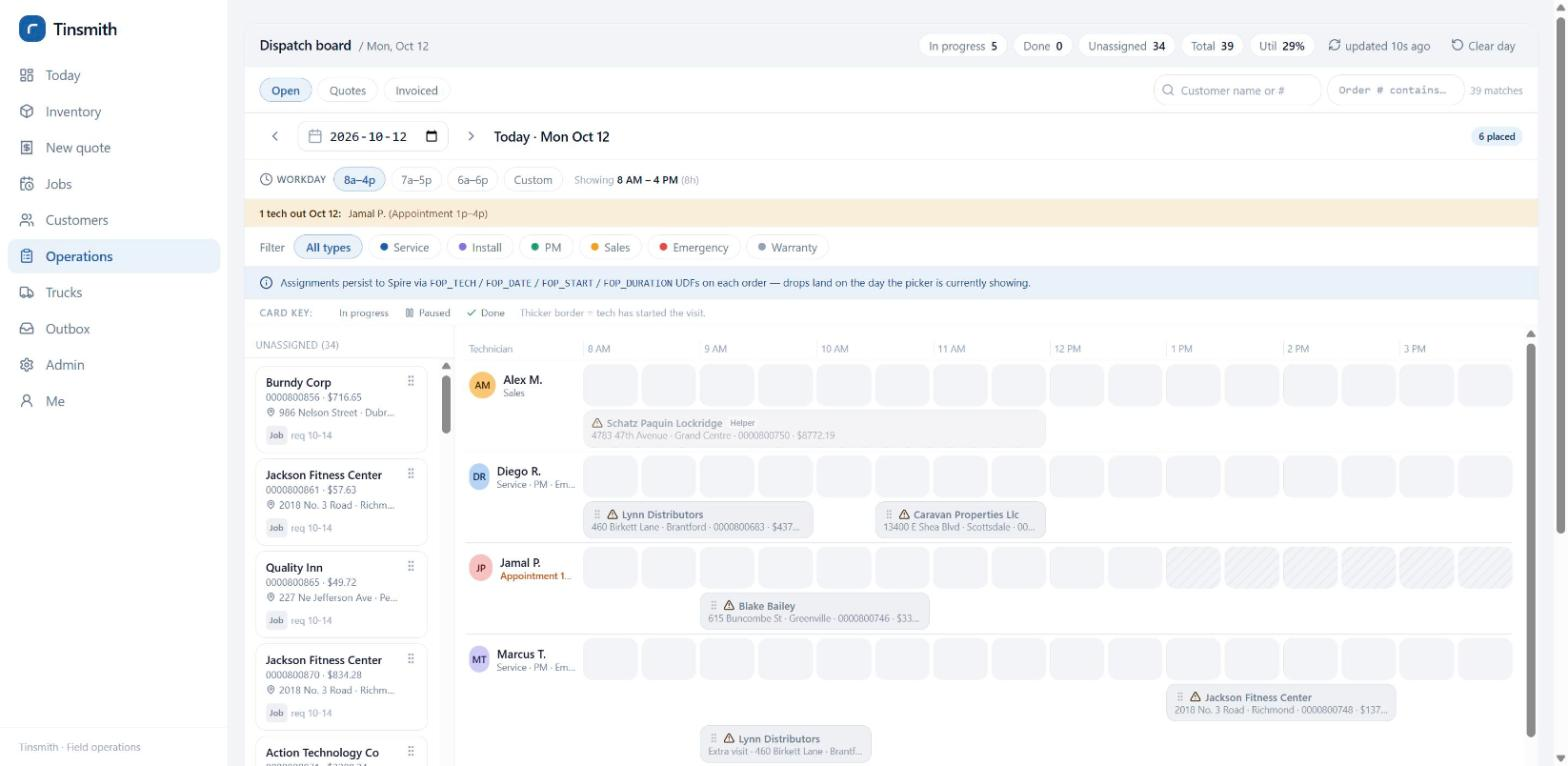
The board fills before the trucks start.
Your dispatcher drags open orders from the queue onto techs in half-hour blocks. Days off and holidays are shaded, skill mismatches turn amber, and multi-day jobs get a visit for each day with its own crew.
Lead tech and helpers on one job
Live status on every card
Assignments written to the Spire order
Dispatch board
8:05 AM
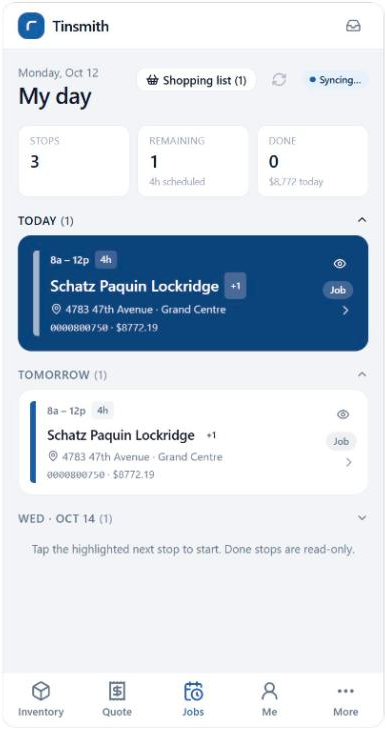
Each tech opens one screen: My day.
Today’s stops in order, tomorrow’s on deck, and one tap to navigate to the job site. The service address comes from the order’s ship-to, so the homeowner’s house is never confused with the builder who pays the bill.
Start the clock when they head out
Customer gets the right arrival window
Upcoming days off shown to the tech
9:40 AM
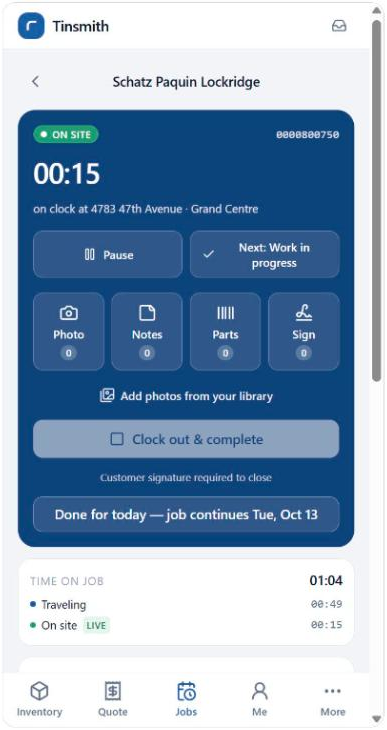
On site, everything is a tap away.
The timer tracks travel, on-site and working time on its own. Photos, typed or dictated notes, parts scanned off the van and the customer’s signature all attach to the same Spire order.
Parts picked from the tech’s own truck first
Barcode scanning in the browser
Pause, resume, or finish tomorrow
11:15 AM
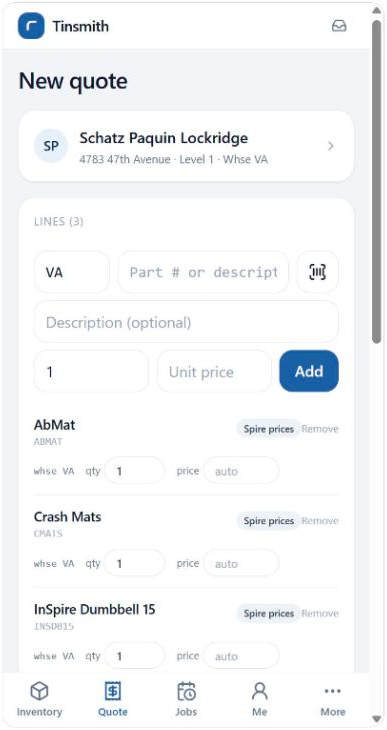
The extra work gets quoted before the van leaves.
Live Spire stock and the customer’s own pricing, photos of what needs doing, and a signed quote that goes straight into Spire as a sales order. No callback, no retyping at the office.
Customer-specific pricing from Spire
Signature and photos on the quote
Builds fine with no signal
4:30 PM
The office sees what happened, not what was planned.
Finished jobs show as done on the board and in Spire. Time on job is broken out by phase. The van’s restock request is waiting, and the office approves the tech’s truck count with one adjustment posted to Spire.
Ready to invoice in Spire
Photos and notes on the order
Truck stock that matches the truck
End of day
Stops completed
14
Quotes signed on site
3
Orders retyped by the office
0
Example day. Your numbers will be your own.
Features
One app for the office, the field and the truck.
Dispatchers, techs, sales reps and admins all sign in to the same app. Each person sees the screens their role needs, on a phone, a tablet or a desktop.
01 For the office
Dispatch boardDrag-and-drop scheduling in half-hour blocks, with live status from the field.
Crews and multi-day jobsA lead tech plus helpers, and a separate visit for each day of a long install.
Availability that warns, not blocksDays off, holidays and skills are flagged so the dispatcher decides.
Customer and order viewNotes, photos, documents and time on job in one place.
02 For the field
My dayStops in order, navigation, and the job site from the Spire ship-to.
Time by phaseTraveling, on site, working, paused and signed off, logged without a timesheet.
CapturePhotos, voice-dictated notes, scanned parts and the customer’s signature.
Field-created jobsTechs who take work from an outside dispatcher can open the order themselves.
03 For the truck
Inventory lookupLive stock by warehouse and the customer’s price, with a barcode scanner in the search box.
Van stockEach truck is a Spire warehouse. Parts used on a job come off that truck.
Transfers and countsRestock the van in a tap. Counts are approved by the office before Spire is adjusted.
On-site quotingQuote, sign and submit the sales order while the customer is standing there.
Built on Spire
Your books stay in Spire. Your crews stop waiting on them.
Tinsmith talks to Spire through its own API. Orders, customers, stock and pricing are read live, and the field’s work is written back to the same sales order your office invoices from. There is no second customer list to keep in sync.
Spire keeps
Customers and ship-to addresses
Inventory, warehouses and pricing
Sales orders and invoicing
Order phases and history
→ live reads← orders, lines, notes, photos, signatures
Tinsmith adds
The schedule and crews
Time on job by phase
Photos and documents
Truck counts and availability
Works in a basement
No signal? Quotes, photos, notes and parts queue on the phone and send themselves when the connection comes back.
Nothing posts twice
Every write to Spire carries a one-time key, so a retry on a bad connection can’t create a second order or transfer.
Your own instance
Each company gets its own hosted copy, its own sign-in and its own file storage. Run by Gemini Logic, not shared with anyone.
Getting started
From first call to trucks on the board.
1
Connect
We connect to your Spire company securely, on premises or in Spire Cloud.
2
Set up
Your job types, techs, skills, trucks and working hours, configured with you.
3
Pilot
A few techs and one dispatcher run real jobs while we tune it to how you work.
4
Roll out
Everyone signs in. We train the office and the field, and we pick up the phone after.
FAQ
Questions we hear a lot.
Is Tinsmith only for HVAC?
No. It started with HVAC contractors, but nothing in it is HVAC-specific. Job types, colours and skills are set up by you, so plumbing, electrical, hearth, refrigeration, fire protection, equipment repair and property maintenance teams all run on it.
Do we need Spire ERP?
Yes. Tinsmith is built for companies that run Spire, and Spire remains your system of record for customers, inventory, orders and invoicing. If you’re moving to Spire, Gemini Logic can implement both.
Do techs need to download an app?
No app store. Tinsmith opens in the phone’s browser and installs to the home screen in a couple of taps. It works on iPhone, Android, tablets and desktops.
What happens when a tech has no signal?
They keep working. Quotes, photos, notes, parts and signatures are saved on the phone and sent in order when the connection returns. Each item shows as waiting until Spire confirms it.
Can we use it with outside dispatchers or warranty work?
Yes. Techs can create their own job on site, with a default bill-to account, PO and reference numbers, and it becomes a normal Spire order the office can invoice.
How is it priced?
From $399 CAD a month plus a one-time setup, priced by the size of your team rather than per user. See pricing.
See it working on your own Spire data.
Book a 30-minute walkthrough with the team that built it. We’ll show you a real dispatch board and a real tech’s day, with no slides and no pressure.