Product
One app for the whole operation.
One connection to Spire.
Tinsmith opens on any phone, tablet or desktop. The office gets the dispatch board, crews get “My day”, reps get inventory and quoting, and everything they do writes back to the same Spire sales order.
01Inventory lookup
“Do we have it, and what do they pay?” Answered in three taps.
Live Spire stock and the right price for the right customer, from the truck, the basement or the parking lot.
- Search by part number, description or a few words. Spire’s own search, so it’s fast on catalogues of 40,000+ items
- Scan a barcode with the phone’s camera, right in the search box
- On-hand quantities in every warehouse, including each tech’s truck
- The customer’s price, worked out the same way Spire does: price-matrix rules first, then their price level, then list price
cap 45/5▢
CAP-45-5
Run capacitor 45/5 MFD 440V
In stockOn hand
- Shop18
- Van 3 · yours4
- East branch7
Add to quote
02On-site quoting
Quote it while they’re standing there. Signed before you leave.
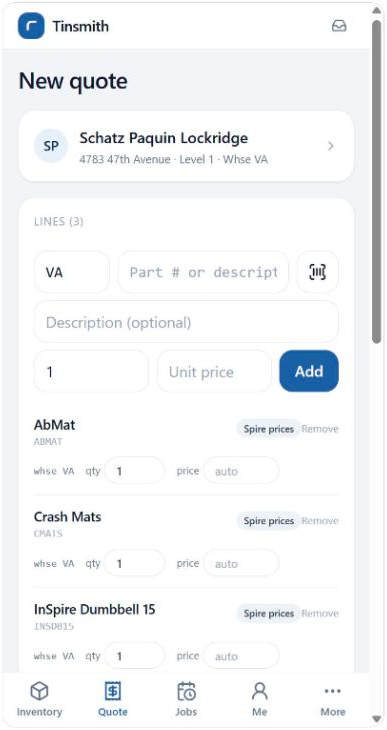
A rep or tech builds the quote at the customer’s door, the customer signs on the screen, and it lands in Spire as a sales order. Nobody at the office types it again.
- Pick the customer from your live Spire list; their ship-to and price level come with them
- Add lines by search or barcode, with live Spire pricing on every line
- Attach photos and a written note to show the office what needs doing
- The customer’s signature is saved to the order, visible in Spire desktop
- No signal? The quote saves on the phone and submits itself when the connection returns
03Dispatch board
See who’s on what. Move it with a drag.
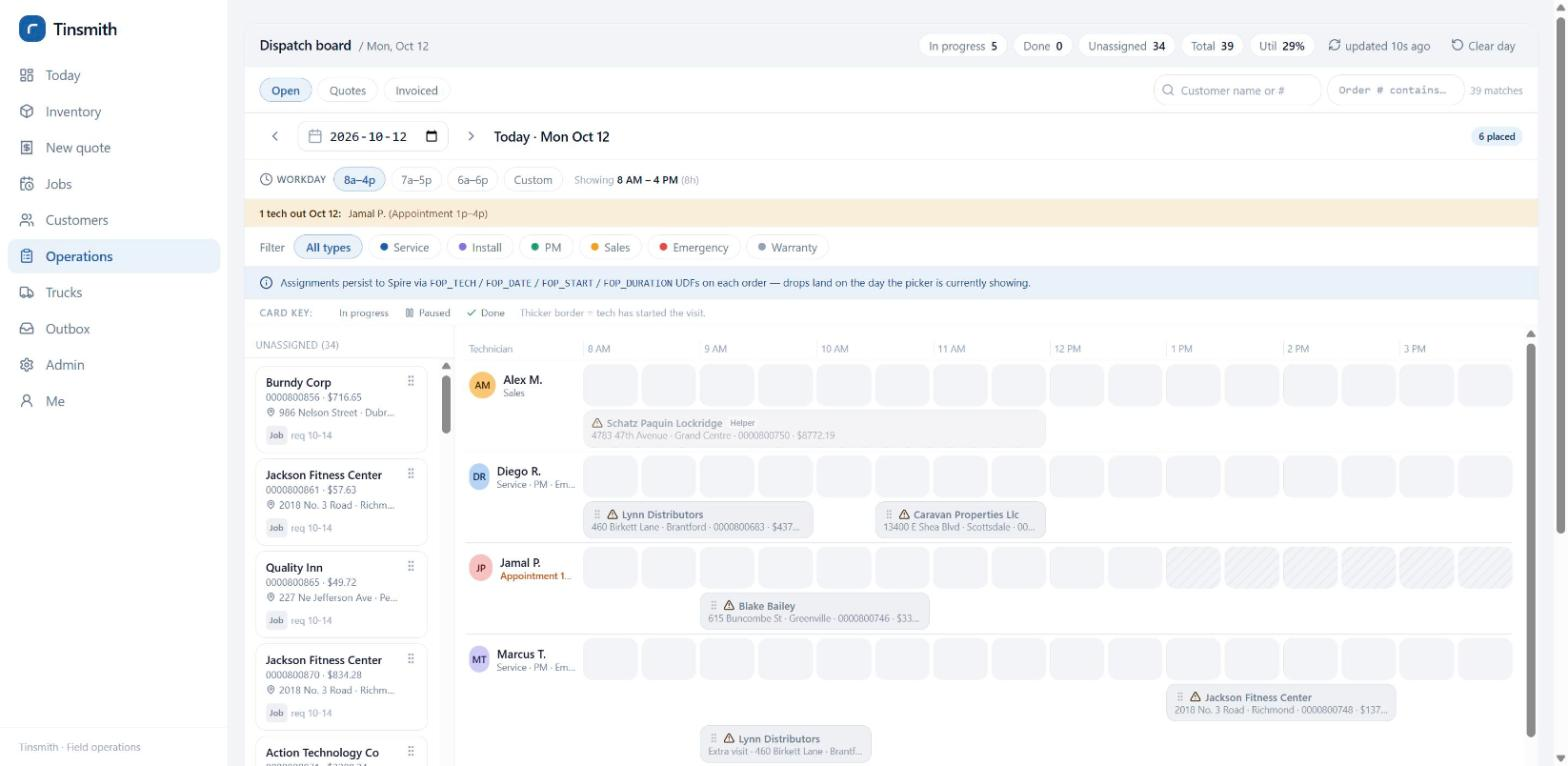
Open orders wait in a queue. The dispatcher drags them onto a tech and a time, and the assignment is written straight onto the Spire order.
- Half-hour blocks, with the workday window set by the company or each dispatcher
- A lead tech plus helpers on one job, each with their own time on the clock
- Multi-day installs and return trips as separate visits, each with its own day and crew
- Days off, part-day appointments, holidays and skill mismatches are flagged. The dispatcher decides; nothing is blocked
- Every card shows live status from the field: on the way, on site, paused, done
- An activity feed of assignments, parts, quotes and sign-offs across the team
04Technician app
Everything for the job, on the phone in their pocket.
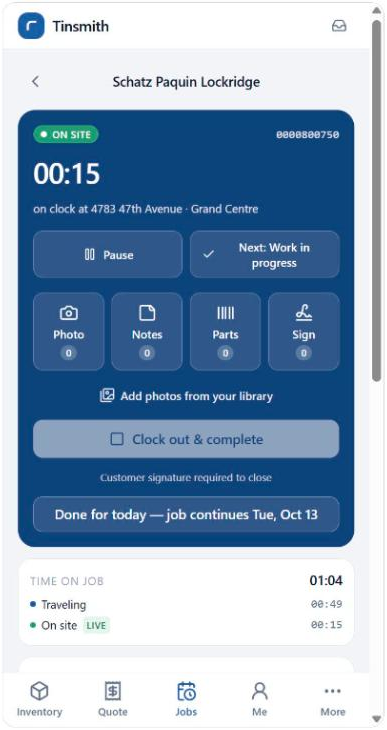
“My day” lists each tech’s stops in order. One tap navigates to the job site; one tap starts the clock.
- Time logged by phase: traveling, on site, working, paused and signed off, with no timesheet to fill in later
- Photos, typed or dictated notes, and parts scanned off the van, all on the Spire order
- Customer signature to close the job, and “done for today” when a job runs over several days
- Office notes, earlier photos and documents for the job, right on the on-site screen
- Field-created jobs: techs who get work from an outside dispatcher can open the order themselves, with PO and reference numbers
05Truck stock
Every van is a warehouse. Spire knows what’s on it.
Link each tech to a Spire warehouse and Tinsmith treats their truck like one, read live from Spire.
- Parts used on a job are picked from the tech’s own truck first, so Spire relieves the right stock on invoice
- Restock transfers between the shop and a van in a couple of taps, posted to Spire immediately
- Truck counts by the tech, approved by the office, then posted to Spire as one adjustment
- Partial counts are fine. An uncounted line is never assumed to be zero
Van 3 · Sara K.
- Items on the truck
- 26
- Used on today’s jobs
- 4
- Count variances to approve
- 2
Illustration.
Live today vs coming next
No vapourware.
Here’s where the product is.
Everything on the left is in use by crews today. Customers help decide the order of what’s on the right.
- Two-way Spire integration
- Inventory lookup + barcode scan
- Customer-specific pricing
- On-site quotes with signature
- Quote photos and notes
- Dispatch board, half-hour blocks
- Lead tech + helpers
- Multi-day jobs and return visits
- Availability and skill warnings
- Time tracking by phase
- Photos, notes, documents
- Parts scanning to the order
- Truck stock, transfers, counts
- Field-created jobs
- Spire order phases kept in step
- Works offline
- Your own job types and colours
- Activity feed
- Service contracts and recurring maintenance visits
- Live truck locations on a map
- Route planning for the day
- Customer arrival texts
- Deposits and card payments on site
- Snap the dispatch sheet, AI fills the job in
Compare
Generic field service apps weren’t built for Spire. Tinsmith was.
| Capability | Tinsmith | Generic field service app | Spire on its own |
|---|---|---|---|
| Live Spire stock in the field | ✓ | Synced copy, if at all | Desktop only |
| Customer-specific Spire pricing on a phone | ✓ | — | Desktop only |
| Signed quote becomes a Spire sales order | ✓ | Export and re-key | — |
| Photos and signatures on the Spire order | ✓ | In their system | — |
| Truck stock as Spire warehouses | ✓ | Separate inventory | No field app |
| One customer list (yours, in Spire) | ✓ | Second list to keep in sync | ✓ |
| Pricing model | By team size | Per user, per month | — |
See it working on your own Spire data.
Book a 30-minute walkthrough with the team that built it. We’ll show you a real dispatch board and a real tech’s day, with no slides and no pressure.